Category Archives: How To (Pi)

Raspberry Pi Knowledgebase added

I’ve created a page containing simple sets of instructions for some key — and not so widely used — Raspberry Pi setup tasks. The goal is to have a single source that I (and anyone else) can check when they need to look up what they should do to perform a specific action: setting up Node.js, for example, or using Dropbox.

You can find the Knowledgebase here.
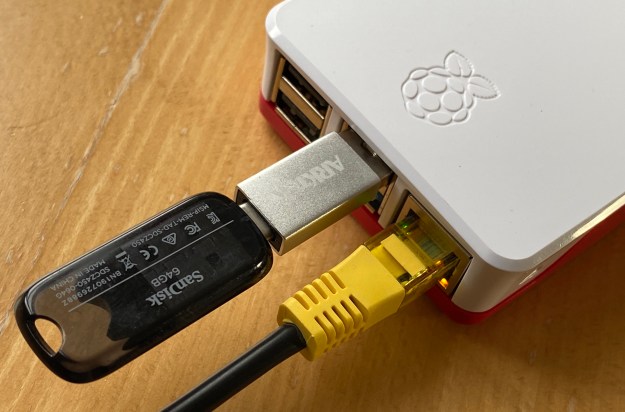
Run a Raspberry Pi 4 from a USB 3.0 drive

The Raspberry Pi is notoriously tough on micro SD cards, which were never intended to be used as primary computer storage.

The Pi 4’s USB 3.0 bus presents a high-speed alternative to the SD card… almost. Unfortunately, you can’t yet boot the Pi 4 off a USB 3.0-connected drive (as you could with the Pi 3) but you can at least use USB for your primary storage and retain the Pi’s micro SD card solely for boot duties. This minimizes the risk to this fragile medium.

521B5F58-51FA-4661-BD65-6BE1195E4177

Continue reading

How to display your Raspberry Pi’s desktop on a Mac

Additional Check out how to view a Pi desktop on an iPad in this post.

I typically connect to my Raspberry Pis via SSH from my main machine, a Mac. This is fine for pretty much all of the tasks I perform on the Pis, but it only provides access to the commmand line. That’s not a problem for me, but I nonetheless wondered whether I might be able to access the Pi’s desktop UI remotely too.

Continue reading

How to toughen up your Pi’s SSH access

I access all of my Raspberry Pis remotely using SSH. While reading about a server operator’s experience of being hacked, I decided to explore ways to make my Pis more secure.

Continue reading

Practise what you preach

Some months back, I posted a guide to backing up a Raspberry Pi SD card using a Mac. I tested it at the time and it worked. It’ll be good to share this, I thought. So I did.

Pibow Raspberry Pi case
SD woes
Continue reading

How to build your own Apple iBeacon… with a Raspberry Pi

US department store Macy’s recently said it is implementing iPhone-based tracking tech the better to encourage browsing punters to buy. Of course, Macy has chosen to pitch this as an Apple technology – figuring, presumably, iPhone owners are more receptive to inducements delivered through technology and have more cash to splash than Android fans.

A Pi's UART pins, connected
Can this operate as an Apple iBeacon? Yes it can
Continue reading

Raspberry Pi Thermal Printing: an update

Reader Daniel Boira recently asked me if I’d experimented with printing large characters on the SparkFun thermal printer (see Hacking a Thermal Till Printer…) that I’d rigged up to my Raspberry Pi’s GPIO. I hadn’t done so, so I thought I’d give it a try.

Printing double-size text
Print characters tall, wide, or tall and wide
Continue reading

Hacking a thermal till printer to work with the Raspberry Pi

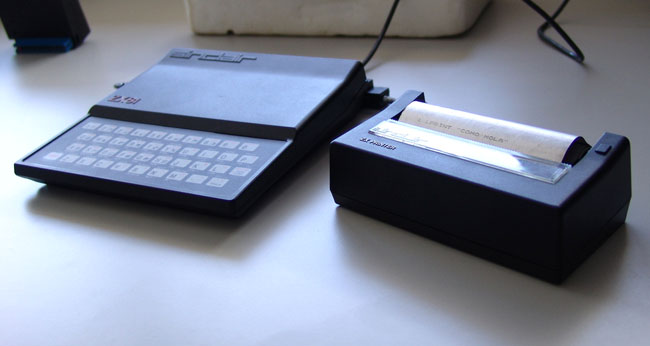
I’ve always had a soft spot for Sinclair’s ZX Printer. Yes it was slow and the print was poorly rendered on its special aluminium-coated paper, which picked up greasy fingerprints like they were going out of fashion, but it was cute, compact and cheap.

The Sinclair ZX Printer
A Sinclair ZX81 and the ZX Printer
Source: Carlos Pérez Ruiz
Continue reading

Back-up a Raspberry Pi SD card using a Mac

I’ve re-installed my Pi’s SD card storage more times than I care to recall. New cards, programming glitches, messing with Linux’s settings files – all of these reasons have forced me to go through the process of re-flashing the Pi’s storage card. That’s bad enough – what’s worse is having to re-download the applications I’d added since the previous install, applying updates and choosing again all of my system preferences.

Continue reading

Connect a Raspberry Pi to a Mac using a USB-Serial adapter

I’m enjoying tinkering with the Raspberry Pi. Alas most of the tutorials and guides available online, of which there are many, focus on hooking the tiny board computer to Windows or Linux machines. Mac-centric guidance is sparse, and I could have used some this week.

A Pi's UART pins, connected
A Pi’s UART pins, connected
Continue reading