Tag Archives: Mac OS X

Primal Scheme: when Xcode settings vie with each other for supremacy

In interesting follow-up to last week’s post about the Xcode build system. This week, while updating another of my macOS CLI utilities, I found my new build script was breaking. Why? It was attempting to create a macOS universal binary out of what I thought were two separate ARM64 and x86_64 builds but were in fact both… er… universal binaries.

About xcode

This occurred with pdfmaker. The script was changed based on my experience building utitool and dlist. What might account for the difference? Comparing the architecture-related entries in the Xcode Build Settings for pdfmaker and dlist showed no differences at all. Both utilities’ project files are to Xcode 16.0 specification too.

Continue reading

Swift Fighting Man: How to duke it out with the Xcode build process and Win!

Today was going to be about so much else, but instead I found myself mêléeing with Apple’s build system.

I have a script I’ve been using very successfully for some years that automates the build process for my CLI apps. It builds a universal binary containing both ARM64 and x86-64 code, wraps it into a macOS installer package and submits the result to Apple’s notarisation service. One command in Terminal and it’s all done, or occasionally you get an error message.

Continue reading

How I went kicking and screaming from AppKit to SwiftUI… and why I plan to stay there

With time on my hands and having noted that rather a lot of iOS and macOS engineering jobs now emphasise SwiftUI skills, I thought it was high time that this old AppKit hand spent some time learning how to implement Swift’s ‘new’ declarative UI construction framework.

You might very well wonder why it has taken me so long. SwiftUI has been around for five and a half years – it debuted at Apple’s Worldwide Developers’ Conference in 2019. Why have I not tackled it before?

Continue reading

Retro text encodings and cross-platform compilings

Working with old tech can take you to unexpected places and expose the quirks of modern coding systems. Case in point: old computers’ supported character sets and their impact on getting workable text when you transfer data across to a recent OS.

I came across this with my Psion Series 3a. I’ve been using it as a note-taking device while researching archive texts on the history of semiconductors. When I was done, I transferred the notes (a single Psion Word file) to a Mac and converted it using my Word2Text utility.

But the computer said, “No”.

Continue reading

udev, I dev: unique identifiers and aliases for USB serial ports on Linux and macOS

An interesting comment on my previous post suggests using udev rules to give connected USB-to-serial adaptors their own, unique names. It works by setting udev rules to apply a symbolic link to specific devices when they are connected.

The approach, outlined in this blog post, works at the command line. This got me thinking: can I do the same in code?

Continue reading

How to find the right Pi Pico board or retro tech connected to your Mac or Raspberry Pi

Recent work connecting old mobile devices — the Psion Series 3a and the Amstrad NC100 — to my Mac caused me to run into an issue with the script I use to determine the Unix device path of the USB-to-serial adaptor I use to talk to these gadgets. Long story short: I ended up converting a Z Shell function into a Swift CLI tool — and adding Linux support into the bargain.

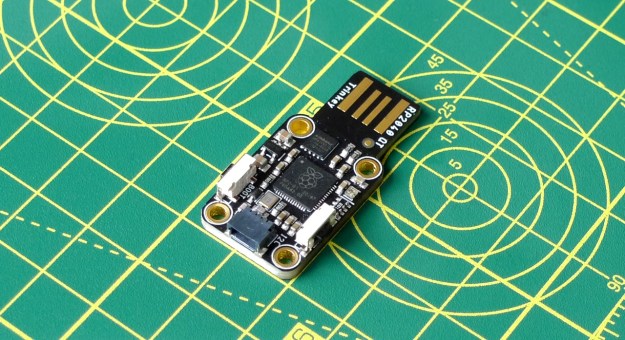
Adafruit’s RP2040 board connects to the host via an integrated USB-to-serial adaptor (Image © 2021, Tony Smith)
Adafruit’s RP2040 board connects to the host via an integrated USB-to-serial adaptor
Continue reading

Old tech for typing: using 1992’s Amstrad NC100 Notepad in 2025

In the early 1990s, I got to play with a new Amstrad device: the NC100 “notepad computer”. At the time, Amstrad was the name in British computer manufacturing. Notably it had shifted more than a million of its PCW series of word processors and while at this point it was pushing its line of IBM-compatible PCs, it hadn’t forgotten the success it had had with word processing kit.

The Amstrad NC100 (Image © 2025, Tony Smith)
Amstrad’s NC100: portable productivity

Enter the NC100, a mobile machine sporting a full size keyboard and a 480×60-pixel LCD used to render 80×8 characters. Pitched as a personal productivity tool, it shipped with on-board diary, calculator, address book, world time and spreadsheet applications as well as word processing software. Heck, it even included BBC Basic, in case you wanted to write your own programs on your daily commute.

Continue reading

How to get a 1990s palmtop communicating 2024-style: connect a Psion 3a to the Interweb

Recap I have acquired a UK-made Psion Series 3a palmtop. I’ve connected it to my Mac. I’ve connected it to my headless Pi server over serial. My next goal: connect the 3a to the Internet.

I never had any great expectations for getting the 3a online. To summarise the problem: the 3a shipped without integrated Internet support. And while it later received it, via the PsiMail email package, Internet access was predicated on a dial-up connection using a modem and an analogue phone line. It is possible to bridge this ancient approach to the modern world of always on broadband and WiFi, but yes, it’s a bit of PIA. Anyway, this is what you do.

Continue reading

How to intercept STDOUT and STDERR output in Swift CLI code

My open source images-to-PDF utility, pdfmaker, makes use of Apple’s PDFKit. While this partnership works as it should, just one aspect bothered me: PDFKit warnings and errors don’t bubble up to the calling code, but are piped via STDERR. The upshot: anyone running pdfmaker may see messages that it hasn’t issued. pdfmaker is a CLI tool, but I can’t just redirect the output to /dev/null — you’d lose everything, not just PDFKit’s grumbles. Instead I had to figure out how to sink PDFKit’s output even though it wasn’t coming via pdfmaker. Here’s how I did the pipework.

Steel pope (c) 2024, Tony Smith. All rights reserved.
Continue reading

How to manage multiple serial devices on a Mac

I connect to my Mac many USB devices that communicate over a serial (UART) bus to send debug information to the host or to receive data and code. You know, Raspberry Pi Picos, Adafruit Feathers, FTDI cables — that kind of thing. Often I have more than one connected. Is there an easy way to see what’s connected without listing /dev every time and to remember connected devices’ paths?

A USB serial device attached to my Mac
Continue reading