Tag Archives: command line

Primal Scheme: when Xcode settings vie with each other for supremacy

In interesting follow-up to last week’s post about the Xcode build system. This week, while updating another of my macOS CLI utilities, I found my new build script was breaking. Why? It was attempting to create a macOS universal binary out of what I thought were two separate ARM64 and x86_64 builds but were in fact both… er… universal binaries.

About xcode

This occurred with pdfmaker. The script was changed based on my experience building utitool and dlist. What might account for the difference? Comparing the architecture-related entries in the Xcode Build Settings for pdfmaker and dlist showed no differences at all. Both utilities’ project files are to Xcode 16.0 specification too.

Continue reading

Swift Fighting Man: How to duke it out with the Xcode build process and Win!

Today was going to be about so much else, but instead I found myself mêléeing with Apple’s build system.

I have a script I’ve been using very successfully for some years that automates the build process for my CLI apps. It builds a universal binary containing both ARM64 and x86-64 code, wraps it into a macOS installer package and submits the result to Apple’s notarisation service. One command in Terminal and it’s all done, or occasionally you get an error message.

Continue reading

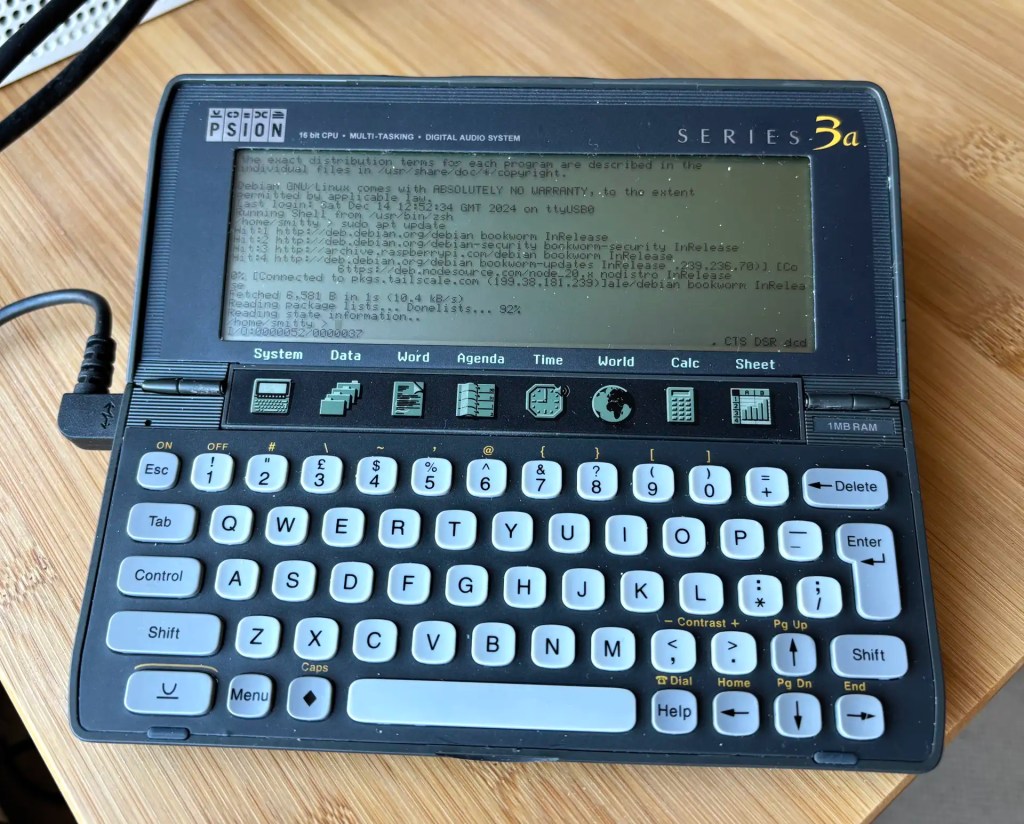
How to access and control a Raspberry Pi with a Psion Series 3a

Recap I have acquired a UK-made Psion Series 3a palmtop. I’ve connected it to my Mac. My next goal is to connect the 3a to the Internet for email. But first… yes, I got distracted: having connected the 3a to a Mac, what about a Raspberry Pi? Could I do more with it than transfer files?

Darn right, I can. I can use it to control my headless server.

Continue reading

Notarise macOS command line apps more quickly

It’s June once more, and time for Apple’s Worldwide Developers’ Conference (WWDC). This is a chance to learn about new functionality and, yes, discover initiatives announced at previous WWDCs that you completely missed the first time around. A case in point: Apple’s revamp of how apps are notarised at the command line, which was revealed at WWDC 21 but I only encountered this week.

Continue reading

Tackle async signal safety in Swift

How do you safely interrupt a command-line program written in Swift? This question was posed to me this week by a reader who got in touch to point out that boilerplate code included in my How to write macOS command line tools in Swift post might not be totally safe: it could leave a program and system in an undefined state, which is never a good thing. So I took a closer look.

Continue reading

How to migrate to native Homebrew on an M1 Mac

Let the great Homebrew migration begin. Yes, Homebrew now has native support for Apple’s ARM64-based M1 chip. The latest version, 3.0.0, released 5 February, will run nicely on your Apple Silicon Mac. There’s a catch, of course. Well, several catches: first, not all of the tools you can install using Homebrew are M1 native yet and, second, Homebrew doesn’t offer explicit migration instructions, that I could find at least.

Apple Silicon Mac, now with native Homebrew support
Continue reading

How To Write macOS Command Line Tools with Swift

I’ve spent a lot of time of late working on several macOS command line tools written in Swift. So I’ve gathered together the key points I’ve learned while creating and updating pdfmaker and imageprep: some best practices and ways to deliver many of the features common to programs the run at the command line.

imageprep running in Terminal
Continue reading

MNU 1.3.0 is out now — and it’s more Shell friendly than ever

I have just released version 1.3.0 of MNU, my macOS menu bar utility. Usually I’d just post a very brief notification of the the update, but this release requires a little more explanation.

MNU: click’n’connect
Continue reading

How to upgrade to the new Nano 5.0 on Mac and Pi

The Nano command line text editor has reached a new milestone: version 5.0.

There are the usual array of bug fixes and tweaks, but what caught my eye among the release notes was the introduction of a scroll indicator. This tells you where you are within a long file and is particularly good for mouse users so you can see where you’ve got to as you mouse-wheel through a document.

Nano 5.0 features a new scroll indicator on the right
Continue reading

How to Script macOS Command Line Tool Notarization and Packaging for Distribution

A few posts back, I talked about the script I use to package macOS apps that I distribute outside of the Mac App Store. That script is designed to simplify the complex process of signing and notarizing not only the app itself but also the installer package its ships within. This is all made necessary by the ever more rigorous, annoying but necessary security provisions Apple is applying to macOS.

Continue reading