Category Archives: Retro

Retro LCD screen illumination: no backlight? Try a frontlight

I have written before about the Psion 5mx, a palmtop computer from the late 1990s, and I have grumbled about its LCD screen. I don’t have a problem with LCD per se — you can’t expect the same screen quality that you get with a modern colour OLED retina display — but in the right light conditions an LCD can be perfectly usable. However, the 5mx screen’s specific level of reflectivity narrows the range of lighting conditions under which it gives you a good, clear view.
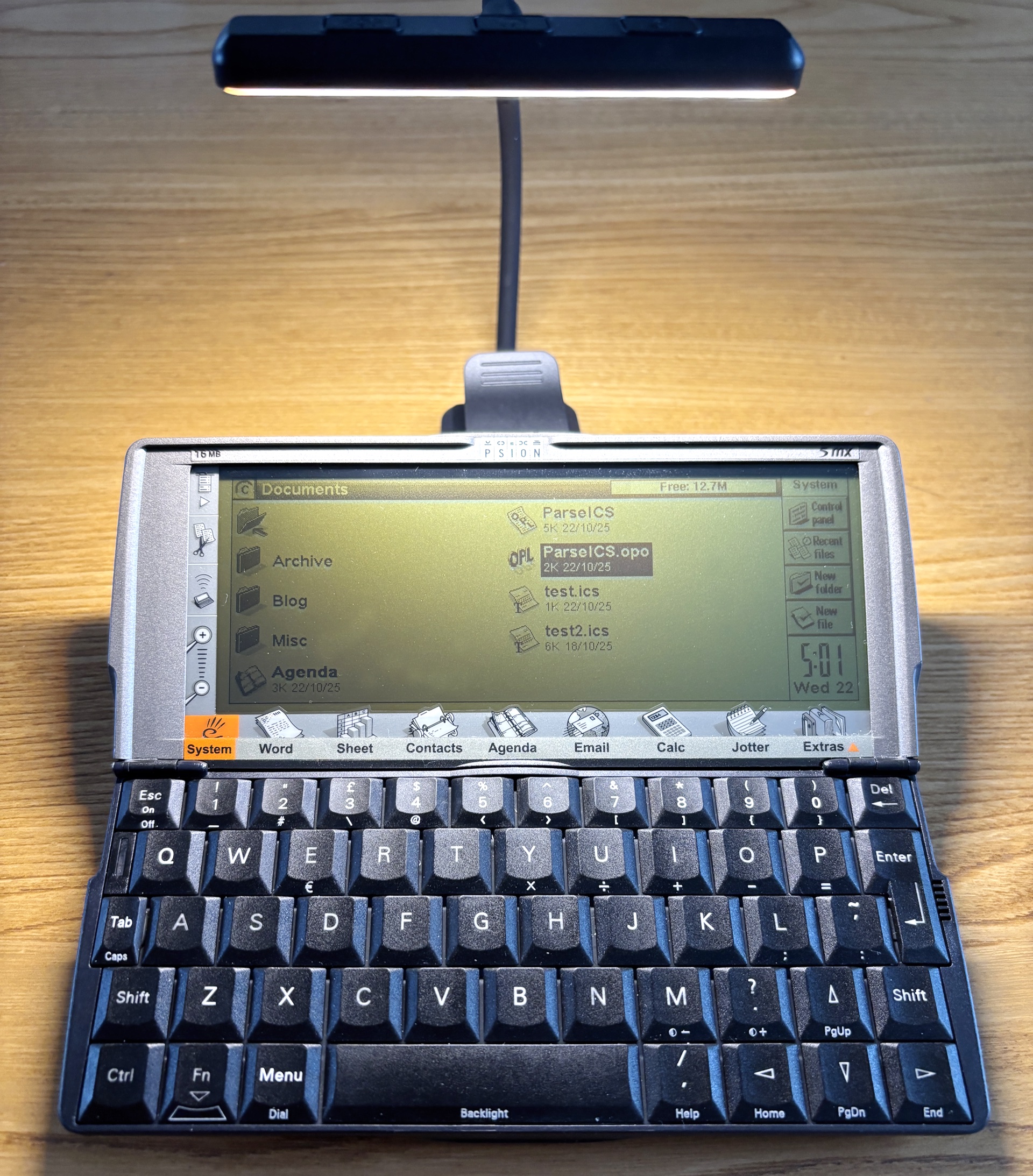
Illuminating your retro tech. Image © 2025, Tony Smith (@smittytone). All rights reserved

What’s odd about this is that the 5mx’s predecessor but one, the 3a, has a really good LCD screen which provides a clear view over a wider range of lighting conditions.

Continue reading
The most essential Amstrad NC100 accessory? It’s got to be a memory card

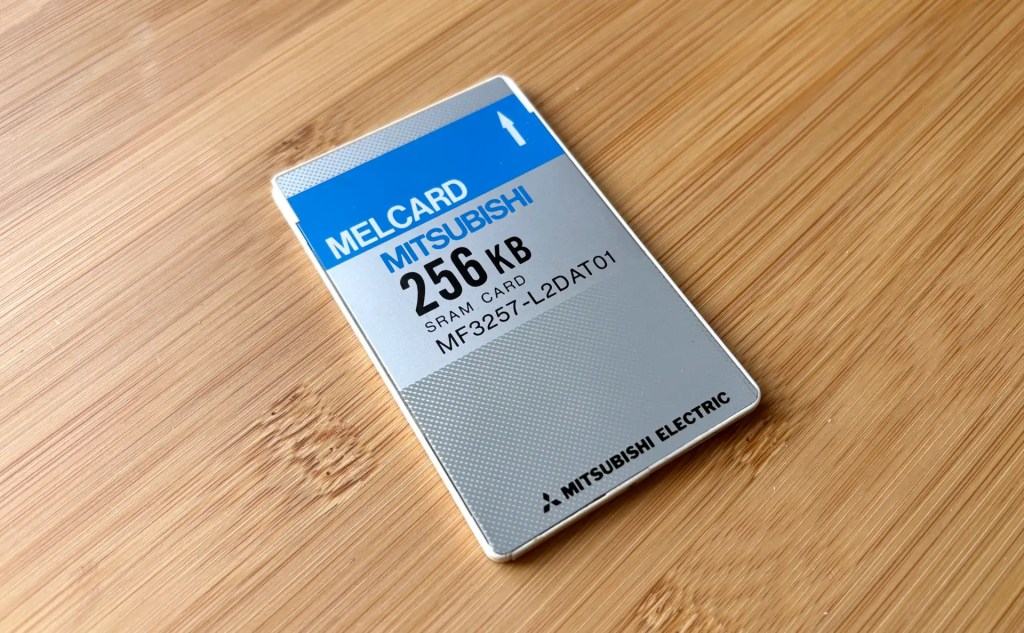
I was resisting buying a memory card for my Amstrad NC100, but in the end I caved in. It was mostly because I have memory cards for my two Psion devices — a proprietary flash drive for the Series 3a and a CompactFlash card for the Series 5mx — because it’s reassuring to know that you can quickly make safe copies of working docs on a device without storage.

An NC100-compatible 256KB PC card. image copyright 2025 tony smith. all rights reserved

This I couldn’t do on the NC100 because it’s rather more limited in the type of cards it supports. Basically, you’re talking 64KB to 1MB SRAM cards in the PCMCIA/PC Card form-factor only.

Continue reading

How to fix Amstrad NC100 coin cell voltage warnings… with paper

Here’s a handy trick for any of you who, like me, have not only taken to retro computing in general but the Amstrad NC100 notepad in particular.

NC100 lithium battery warning

I was frequently being told that the machine’s back-up CR2032 coin cell was running low. This despite it being installed fresh out of the packet, and not long enough ago for me to expect such warnings.

Continue reading

How to bring Amstrad NC100 screenshots to modern graphics apps

While browsing some scans of old, out-of-print books about the Amstrad NC100, I discovered that it has a built-in screenshot facility. I knew my various Psion devices could do this, but not the NC100.

NC100 screenshot BBC Basic

The trick — press ControlShiftS — was mentioned in Robin Nixon’s The Amstrad Advanced User Guide, published in 1993 by Sigma Press. The book contained BBC Basic and C utilities for converting the raw bitmap data generated by the keypress.
I immediately keyed in the C code to try it out. It did the job.

Typing in a listing! What an old-school feeling!

Continue reading

Psion of the times: using a 90s palmtop in the 21st Century

OK, so it was one of those purchases you can’t help yourself from making. A random, unprompted visit to eBay and suddenly I was £170 down but up one Psion Series 5mx palmtop with all the trimmings. And in very good condition it all is too.

Psion Series 5mx. Image copyright 2025 Tony Smith (@smittytone) All rights reserved

The Series 5 debuted in 1998 as the follow-up to the Series 3 family. I already have a 3a, the same model that I used for time a time back in the day. The 5 was a major upgrade: an ARM processor in place of an x86, more RAM of course, but crucially a backlit, touch-sensitive screen (plus device-dockable stylus) and a deck of larger, less calculator-like keys. In addition, out went the Series 3’s proprietary memory card format and in came a CompactFlash slot (though only one, not two as before). Psion also adopted a new serial comms port that negated the need for the Series 3’s 3Link ‘soap on a rope’ cable, which converted the 3’s proprietary bus to RS232.

Continue reading

Ancient Palmtops as serial terminals, Part 2: the Psion 5mx and the homelab

Last year, I performed some jiggery-pokery on my headless Raspberry Pi-based HomeLab to allow my veteran Psion 3a palmtop to be used as a serial terminal for those times when SSH-ing in was not an option. The age of the 3a meant it was a sub-optimal experience, but it was usable. I recently acquired a Psion 5mx, released half a decade after the 3, and put it to the same task.

A Psion 5mx running Hermes to show a Raspberry Pi serial terminal. Image © Tony Smith (@smittytone)

The experience is much better, but I needed to tweak the PI-side settings to get results.

Continue reading

Retro text encodings and cross-platform compilings

Working with old tech can take you to unexpected places and expose the quirks of modern coding systems. Case in point: old computers’ supported character sets and their impact on getting workable text when you transfer data across to a recent OS.

I came across this with my Psion Series 3a. I’ve been using it as a note-taking device while researching archive texts on the history of semiconductors. When I was done, I transferred the notes (a single Psion Word file) to a Mac and converted it using my Word2Text utility.

But the computer said, “No”.

Continue reading

New vs Old, King Jim vs Sir Alan: Will the Pomera pummel the NC100?

I was indirectly introduced recently to the Pomera DM250, a Japanese ‘mobile typewriter’. I quite liked the look of it and, as a writer, its utility. It’s now being made available to a global audience officially rather than via eBay importers.

The Pomera DM250 mobile typewriter from King Jim
The Pomera DM250 ‘mobile typewriter’

So the question is, can this NC100 survive Pomera’s arrival?

Continue reading

Old tech for typing: using 1992’s Amstrad NC100 Notepad in 2025

In the early 1990s, I got to play with a new Amstrad device: the NC100 “notepad computer”. At the time, Amstrad was the name in British computer manufacturing. Notably it had shifted more than a million of its PCW series of word processors and while at this point it was pushing its line of IBM-compatible PCs, it hadn’t forgotten the success it had had with word processing kit.

The Amstrad NC100 (Image © 2025, Tony Smith)
Amstrad’s NC100: portable productivity

Enter the NC100, a mobile machine sporting a full size keyboard and a 480×60-pixel LCD used to render 80×8 characters. Pitched as a personal productivity tool, it shipped with on-board diary, calculator, address book, world time and spreadsheet applications as well as word processing software. Heck, it even included BBC Basic, in case you wanted to write your own programs on your daily commute.

Continue reading

How to get a 1990s palmtop communicating 2024-style: connect a Psion 3a to the Interweb

Recap I have acquired a UK-made Psion Series 3a palmtop. I’ve connected it to my Mac. I’ve connected it to my headless Pi server over serial. My next goal: connect the 3a to the Internet.

I never had any great expectations for getting the 3a online. To summarise the problem: the 3a shipped without integrated Internet support. And while it later received it, via the PsiMail email package, Internet access was predicated on a dial-up connection using a modem and an analogue phone line. It is possible to bridge this ancient approach to the modern world of always on broadband and WiFi, but yes, it’s a bit of PIA. Anyway, this is what you do.

Continue reading