
In interesting follow-up to last week’s post about the Xcode build system. This week, while updating another of my macOS CLI utilities, I found my new build script was breaking. Why? It was attempting to create a macOS universal binary out of what I thought were two separate ARM64 and x86_64 builds but were in fact both… er… universal binaries.

This occurred with pdfmaker. The script was changed based on my experience building utitool and dlist. What might account for the difference? Comparing the architecture-related entries in the Xcode Build Settings for pdfmaker and dlist showed no differences at all. Both utilities’ project files are to Xcode 16.0 specification too.
Running the build script with the -d switch to display the called tools’ output revealed the pdfmaker build contained the phase CreateUniversalBinary after the linking phase whereas the dlist build did not: it went straight from linking to GenerateDSYMFile, which in the pdfmaker build comes right after CreateUniversalBinary. The CreateUniversalBinary phase, like my new build script, calls the lipo tool to generate a universal binary from individual ARM64 and x86_64 builds.
Was there any difference in the two projects’ Xcode Build Phases or Build Rules settings that might account for this? Again, no.
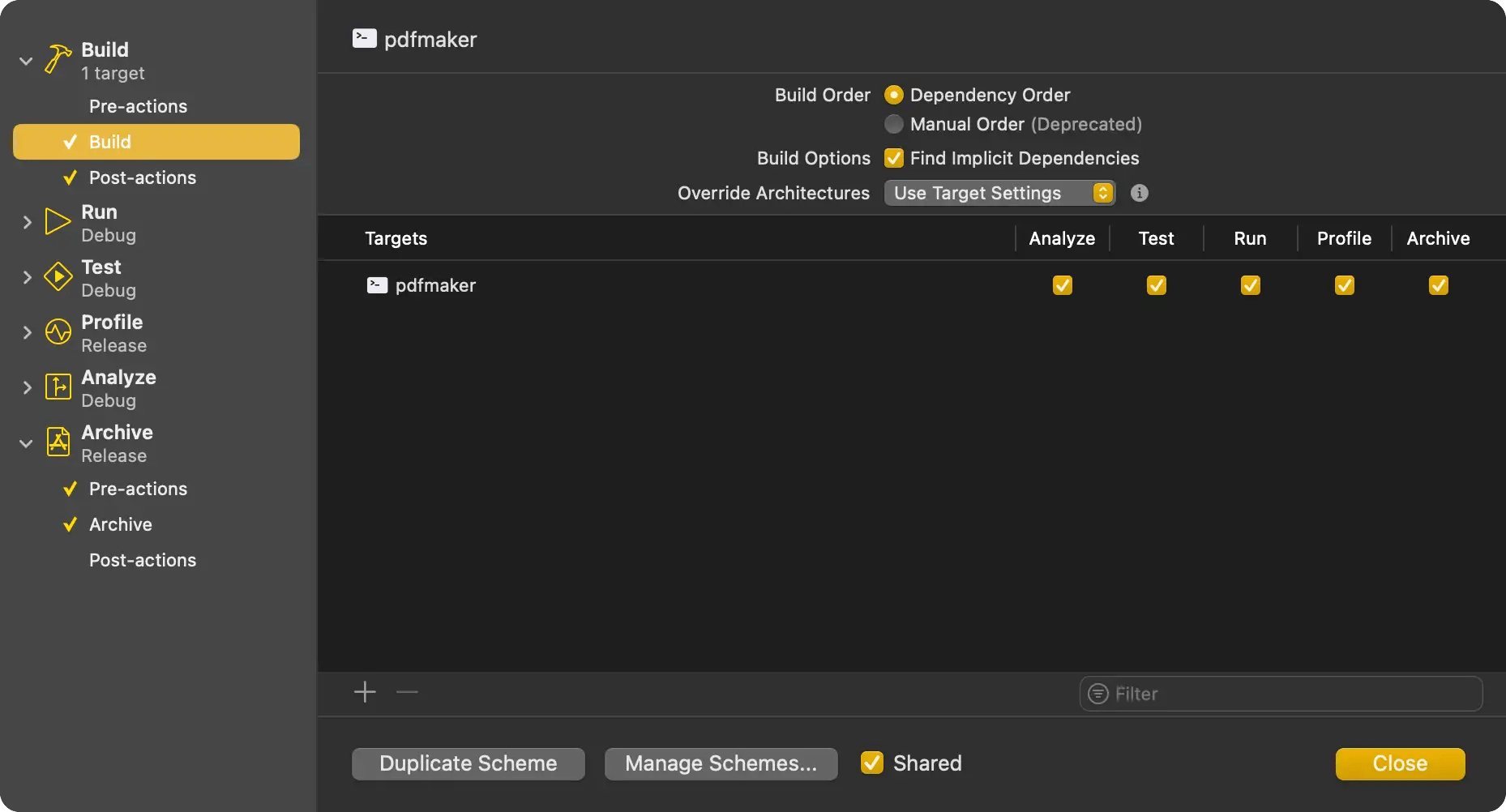
I had a hunch and checked out the two projects’ Xcode Schemes settings. Schemes define how different build configurations — say, Release and Debug builds — are used in the context of testing, running, archiving, analysis and so forth. Each of these contexts when actioned can be set to trigger a Debug or Release build. You can change the defaults and, indeed, add your own build configurations if the standard Release and Debug aren’t quite what you need. I checked out the Build component of the two utilities’ Schemes settings and here at last was the difference I was looking for, in the Override Architectures setting.
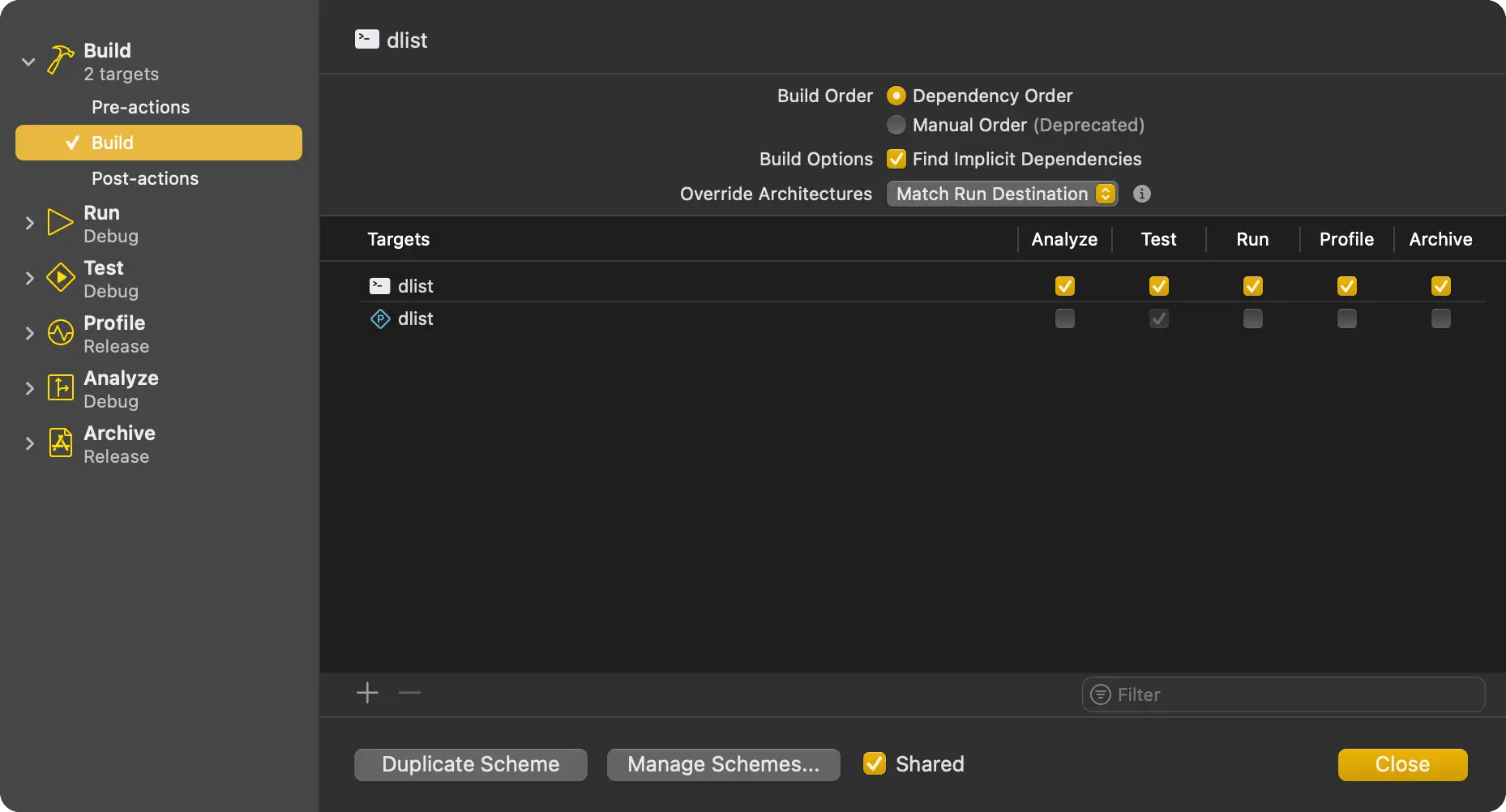
dlist had this set to Match Run Destination, whereas pdfmaker’s setting was Use Target Settings. The Target, you may recall, is Xcode’s notion of a product you’re going to build. An Xcode project can contain multiple targets: in PreviewMarkdown, for example, I have targets for the host app, each of the two Application Extensions it contains, and a fourth which is a standalone app I use for viewing the output of the rendering engine. Both the dlist and pdfmaker projects have a single target each.
This is how the Override Architectures options are described:
“Match Run Destination — Build only the most appropriate architecture for each target, based on the selected run destination. Use this option to reduce build times for iterative development.
“Use Target Settings — For targets with the ONLY_ACTIVE_ARCH build setting set to YES, build only the most appropriate compatible architecture based on the selected run destination. For targets with the ONLY_ACTIVE_ARCH build setting set to NO, build all compatible architectures.”
So for dlist, set to Match Run Destination, my script has to perform two builds, ARM64 and x86_64, respectively, and then use lipo to combine them.
pdfmaker is set to Use Target Settings, and said are set (as they are in the dlist project) to build to the host architecture for Debug builds, but both architectures for Release builds. And since I’m doing Release builds at this point, I get not separate binaries but two identical universal binaries, and trying to combine them is what causes lipo to spit the dummy.
So I need to choose a Scheme Override Architectures setting that’s common to all projects, and update my script accordingly. The default on new projects, by the way, is Match Run Destination. I have never changed this setting before, so I suspect Apple changed the default at some point in the past, after I created the pdfmaker project, which was around five years ago.
I’m going to make all my projects adopt Match Run Destination. But I’ve updated my build script to handle both — use the -u switch for this setting — just in case I re-open an old project down the line and forget to change its Scheme’s Override Architectures setting.
Incidentally, There’s a third Override Architectures option, Universal, which always builds universal binaries. I’ve chosen to ignore this because it means all builds are universal, ie. take twice as long, and that’s not really necessary for quick debug builds. Releases will always be universal, at least for the foreseeable future, so I’ll check cross-platform stuff then, but your project may find this setting useful.
The bottom line, of course, is to always keep in mind that Xcode’s build system is complex and what one part may be set to might be overridden by another. For instance, the output from the pdfmaker build says:
--- xcodebuild: WARNING: Using the first of multiple matching destinations:
{ platform:macOS, arch:arm64, id:00008122-001408413A29001C, name:My Mac }
{ platform:macOS, arch:x86_64, id:00008122-001408413A29001C, name:My Mac }
{ platform:macOS, name:Any Mac }
That implies you’re going to get an ARM64 binary. Yet the Scheme setting means you’ll actually get a universal one so there’s no need to call lipo.
So if you’re debugging build failures (as opposed to compilation and linking failures) there will be multiple settings groups you need to check.
 smittytone messes with micros