
I was resisting buying a memory card for my Amstrad NC100, but in the end I caved in. It was mostly because I have memory cards for my two Psion devices — a proprietary flash drive for the Series 3a and a CompactFlash card for the Series 5mx — because it’s reassuring to know that you can quickly make safe copies of working docs on a device without storage.
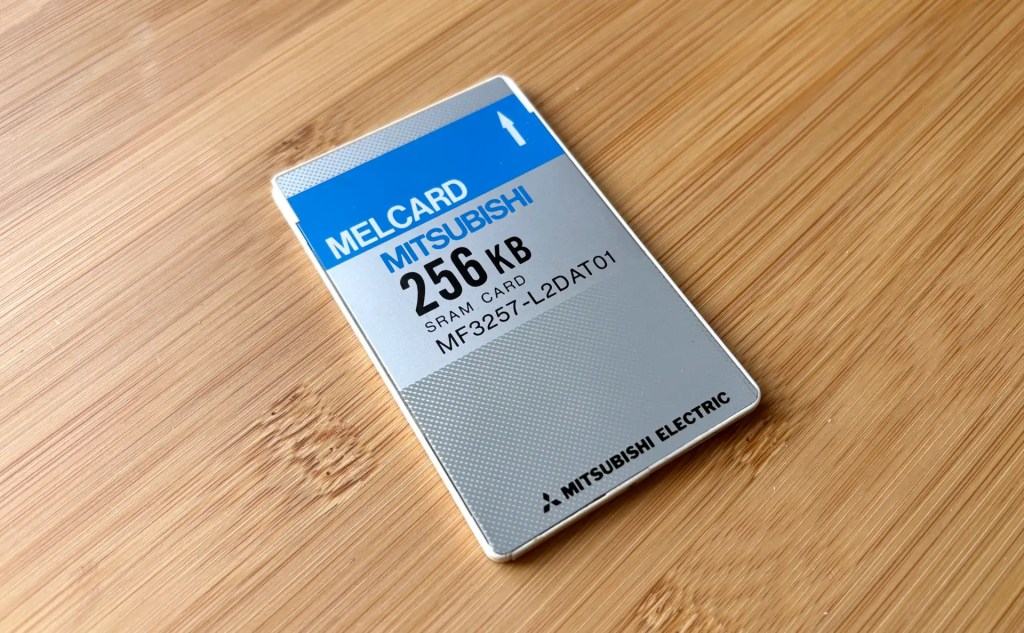
This I couldn’t do on the NC100 because it’s rather more limited in the type of cards it supports. Basically, you’re talking 64KB to 1MB SRAM cards in the PCMCIA/PC Card form-factor only.
These were pricey enough back in the day, but the migration from battery-backed RAM to flash, which of course needs no power to retain its contents, triggered a rapid evolution in the capacity, performance, range of form-factors and cheapness of flash cards, a process that left the NC100 well behind the times.
Nowadays, you can only find secondhand SRAM cards, and given their age and low capacities they’re all excessively priced. The issue seems to be the format’s use in industrial systems. Not common enough to ensure fresh supplies of new, cheap cards but sufficiently in demand by companies with legacy kit to command sellers’ market prices.

That’s why I long held off buying one. But then I spotted a 256KB card on eBay for 50 quid, and decided to take a punt. I’m very glad I did.
The NC100 contains just 64KB of RAM (presumably to keep to the original price point of £99.99), of which 16KB or so is used for the screen RAM and for environment variables. The remainder is used both as memory to hold the document being edited and as storage for all your other files.
I have, once, run out of storage, but transferring files to my Mac is easy enough that I can generally erase docs when I’ve finished with them. So it’s not like I really need those extra 262,144 bytes.
But having them actually makes a big difference to my usage of the device.

The NC100 treats the memory card not as memory but as storage — the card is, If you will, the Notepad’s missing hard drive, albeit one that loses is contents when the card’s removable coin cell runs down after five years or so.
Additionally, the NC100’s OS uses the card storage in preference to the main RAM. Documents are loaded into RAM from the card for editing, but either periodically or on exit, the edits are copied back. I know this to be the case because documents being edited will appear under U(pper) or L(ower) — the two segments of the NC100’s RAM — if you power off the machine, remove the card, power up and then check the file list. Restore the card and the NC100 quickly reconciles the two copies into one, on the card. With the card in place, when you hit Stop to end editing, you may notice the word Storing… appear very briefly on the screen while the file is written to the card.
Start using a memory card and suddenly documents, even existing ones when edited, start appearing in the file list with C as their location rather than U or L built-in RAM.

Pretty soon you’re working off the card without any thought about it whatsoever. The snag, of course, is that all the files disappear from the file list if you take the card out and don’t slot it back in. That’s how you might treat a memory card, especially in a retro device that’s more power sensitive than modern kit is, but not how you’d treat a hard drive, of course. So the sensible thing to do is just to leave the memory card in place.
The one downside is that it pokes out a little too far (1.2cm) for comfort (and certainly to get the NC100 smoothly into its original slip case, though with care it is possible to do).
The other benefit of the extra capacity the card provides is that it now makes using the NC100’s built-in BBC Basic more feasible. This understandably expects to work with a good chunk of the machine’s 64KB of RAM, which it can when none of the memory is being used to store your documents.

I hadn’t spent any time with the NC100’s Basic for this very reason, until I got the card. Now I have space to use it — just mucking about for now — and to store typed-in programs.
So I would very much recommend a memory card as an important upgrade for your NC100, especially if you can live with a lower-sized (ie. cheaper) one.
In fact, I’m now greedy and want a second card so that I can realistically try out the NC100-oriented CP/M clone ZCN — but that’s for another post.
 smittytone messes with micros