
I have a soft spot for the technology of my younger days. In the mid-1990s, for example, I was in my late twenties and one of the machines I used for a time — all my MacWorld Boston 1994 coverage was written on one — was the Psion Series 3a. Pitched as a portable personal organiser, it was a palmtop PC running a 16-bit OS, SIBO aka EPOC 16, on an x86 CPU.
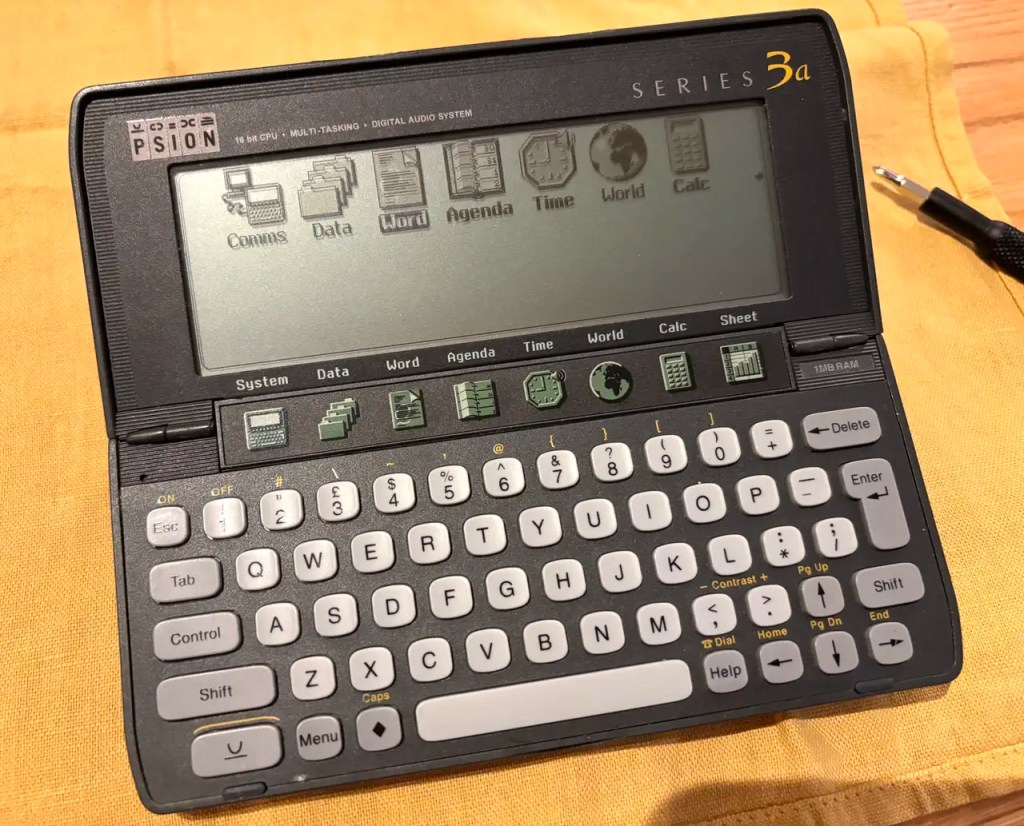
Running, I might add off a couple of AA batteries (with a coin cell to maintain RAM disk contents when the main pair were replaced) that could last for at least a month. No backlight on the monochrome LCD, though, which makes the device’s use in dim lighting tricky. Strong, over-the-shoulder lighting is essential.
Much as I love old kit, I don’t own much of it, partly because I lack the space to store it, but mostly because I have too much to do that requires a modern, Internet-accessible machine. This doesn’t stop me gazing longingly at eBay listings from time to time. Usually I never buy — but then I came across a working 1MB 3a plus accessories for really not much money at all.
It duly arrived but in addition to the stated damage to a tiny metal part that sits between the main batteries to keep them connected, I found the 3a’s touch-sensitive app shortcut bar over the hinge was dead. The broken battery bridge had fallen out in transit, but that was easily fixed by replacing it with a suitably sized washer and some glue. I didn’t know why the bar wasn’t working, but I suspected a dislodged ribbon cable because I’d seen just such a problem on a very useful YouTube video courtesy of Side Questing. The video gave me the confidence to open up the 3a and check.
The problem was indeed that the ribbon cable had slipped out, so I fixed it back and now I have a fully working 3a.

But what to do with it? I’m quite keen to use a portable, keyboard-based writing device. But that begs a question: how can I get documents off it? Remember, this gadget was released in the Windows 3.11-Windows 95 transition timeframe, and while it had Mac support, that was for System 7 and the Din-style Apple serial ports of the time. Could I connect my 3a to an up-to-date Mac?
Yes!
My 3a came with a Psion 3 Link, a wired dongle that bridges the 3a’s prprietary comms port and an old skool RS-232 D-sub connector. Few if any machines — and certainly no laptops — today ship with those ports, so I ordered a suitable USB adaptor. The key thinmg is to make sure it’s based on the Prolific Technologies PL2303 chip. I found one with a USB-C connector: perfect for a Mac.
Even better, Prolific makes its drivers available for free from the Mac App Store, so intallation was as straightforward as it could possibly be. Just make sure you also enable the driver as a Driver Extension in System Settings > General > Login Items & Extensions. Installation from the app alone isn’t enough to get them working.


So I have the two devices physically connected, and running Psion’s Comms package (installed off the dongle) and Miniterm on the Mac allowed me to verify they can communicate. But what about document transfer? Googling yielded a number of solutions, but the one I chose to try first and have stuck with is to installed the DOSBox Staging emulator and run Psion’s MCLink package (downloadable from Steve Lichfield’s PsiFind archive). DOSBox Staging is readily configured by file, so I set it up to run MCLink on ‘boot’, and wrote a script to get the PL2303 adaptor’s device file path, extract the device name and inject it into the primary DOSBox Staging config file before starting the emulator.
So, connect the 3a, enable its Remote Link feature — basically a server that listens for MCLink or other Psion comms software — and then run the script. With MCLink up and running, I can initiate file transfers from the 3a itself. Files arrive in a folder referenced as a mount point in the DOSBox staging config. When I’m done, I just type exit to quit MCLink and then exit again to quit DOSBox Staging.
Incidentally, run DOSBox Staging immediately on installation and type config -wc to generate a default config file. This is what the script then manipulates.

The only snags are that transmission is a slow 9600bps which, as the files are small, isn’t too much of a drag (but I’d like to address) and the 3a’s applications use proprietary formats so they can’t be read on the Mac. But see Update, below
Fortunately, Googling for the format specification led me to Clive Feather’s The Psionic Files, an attempt to document a whole mass of Series 3 details that Psion itself didn’t publish. Clive worked on the information in the late 1990s, put them online and, thankfully, has kept them there.
His data was sufficiengtly comprehensive for me to produce a Mac CLI app to convert a transferred Word file into plain text so I can then open up a version in VSCode or Zed or whatever. It works and you can find the initial code at my GitHub repo. The next phase is to use the style and emphasis data within the files to generate Markdown tagging and add it to the text. That’s a work in progress.
So at the end of a week with the 3a, I can connect it to my Mac, transfer Psion Word files I’ve typed, and make use of the content on the Mac.

Incidentally, I also spent a few hours delving into Classic Mac emulation with a view to running Psion’s original PsiMac Mac-to-3a comms software. The emulator, Basilisk II, is great, and I got Psion’s MacConnect 1.1.2, 1.1.4 and 1.2.0 installed in sequence, but I had no joy getting it to see the Psion, even though Basilisk allows you to bind a serial device on the host to the emulated Mac’s modem port. There’s some uncertainty whether MacConnect was really just for EPOC 32 devices, or whether there’s a serial port linkage issue here (reading between the lines of emulation forum posts, Basilisk doesn’t enable serial port usage). But I continue to prod it.

The next leg is to connect to 3a to the Internet. This is the main reason for the emulation: so I can run Psion’s ancient setup software to copy over the necessary TCP/IP libraries. I’m not really bothered about web access — the 3a’s crude screen makes that more a ‘because I can’ rather than something I would actually use. But an email client — now that would be useful. And this is what I’ll be covering in the next instalment.
Update I was using MCLink at 9600 bits per second. The 3a will stretch to 19,200bps. To set MCLink to use this speed, set the final line in your dosbox-staging.conf file (on a Mac it’s in ~/Library/Preferences/DOSBox/) to:
c:\mclink\mclink -p1 -b19200
Make sure you also set the speed to 19200 in the Remote link dialog box on the 3a.
 smittytone messes with micros
Libre Office is a good way of opening up legacy word files and runs natively on the Mac. I miss the Nokia E90 in a similar way to the way you missed creating with the Psion 3.
if you can get them over you can get old Word files to work on a Mac with libre office, as an easier alternative. I have been thinking if such a thing was possible with the Nokia E90 which was a fantastic portable writing machine